
Hundreds of employees, thousands of photos, and a WhatsApp group nobody wants. A guide for HR teams and event producers: how to plan the year-end party photos so every employee finds themselves - with a checklist, privacy notes and a timeline.
The simplest way to give every employee their photos from the year-end party is a face-recognition gallery: upload all the photos once, and each employee opens a link or scans a QR code, takes one selfie and gets every photo they appear in. No dumping a thousand photos into the company WhatsApp group, and no one in HR sorting photos in the evenings.
Why Company Party Photos Get Lost
- The photographer sends a link to a folder of fifteen hundred photos, and nobody scrolls to the end
- The company WhatsApp group fills up with compressed photos, and half the staff mute it
- Whoever produced the event spends two weeks fielding requests like "is there a photo of me with the team?"
- The best photos - the ones employees took themselves - stay on their phones
Checklist: What to Set Up Before the Party
- Create an event and try it on a few sample photos - a few minutes, no credit card
- Decide whether you want the company's branding on the gallery and event page (with Snapick Plus)
- Brief the photographer: shoot small groups and teams too, not just the stage, and deliver the photos at full resolution
- Set an access code, so only employees can open the gallery
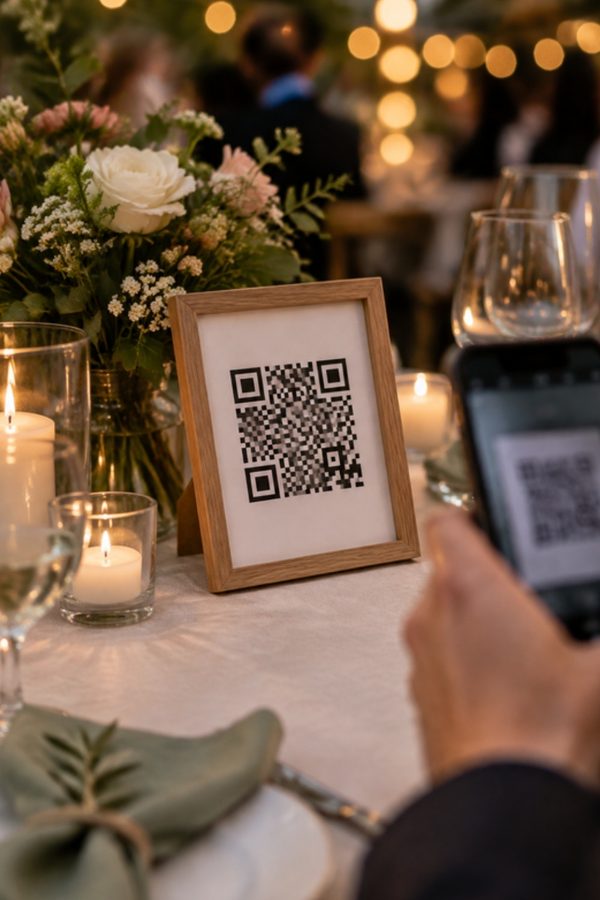
- Print QR signs for the guest album and place them on the tables, by the bar and at the entrance
- Send employees a short note in advance: what it is, how it works, and that the selfie isn't stored
- Publish the event before the party starts, so the QR works from the first minute
Privacy at Work: What to Know
At a company party some employees would rather not appear in photos, and photos from a fun night aren't always right for every eye in the organization. Since August 2025, when Amendment 13 to Israel's Privacy Protection Law came into force, biometric data counts as "information of special sensitivity" - one more reason to pick a tool that takes this seriously:
- The selfie is used only to find that employee's photos at that event, and it isn't stored
- An access code keeps the gallery inside the company
- The event manager can delete photos from the gallery - for instance when an employee asks for one of theirs to come down
- The gallery doesn't stay up forever: 6 months, or 12 with Snapick Plus, from publishing
This isn't legal advice. If your organization has a privacy officer, update them before the event, and agree with employees in advance on any use of the photos beyond the gallery - in the internal newsletter or on the company's social channels, for example.
What Happens on the Day
During the party, employees scan the QR on the tables and upload photos and greetings straight from their phones to a shared album - up to 30 photos each, with no app and no sign-up. After the party you upload the photographer's photos, Snapick finds the people in them, and every employee takes a selfie and gets every photo they appear in, at original quality.
The Company's Branding on the Gallery
Snapick Plus adds full branding - the company logo on the event page and the gallery - so the gallery looks like part of the event rather than an outside tool. It also includes up to 10,000 photos and a year of storage, which is handy when you want to look back at the photos ahead of next year's event.
| Snapick | Snapick Plus | |
|---|---|---|
| Price per event | ₪399 (₪449 from 1 November 2026) | ₪599 |
| Personal face-recognition gallery for every employee | ✓ | ✓ |
| Photo and greetings album from employees | ✓ gift | ✓ |
| Photos | Up to 5,000 | Up to 10,000 |
| Storage from publishing | 6 months | 12 months |
| Company logo on the gallery | ✗ | ✓ |
One payment per event, with no subscription and no quote. Organizations and production companies that run many events a year are welcome to talk to us.
A Suggested Timeline
| When | What to do |
|---|---|
| Two weeks before | Create the event, try it on sample photos and choose a package |
| A week before | Brief the photographer, set an access code and print QR signs |
| A day or two before | Publish the event and send employees a short note |
| At the party | Employees upload photos and greetings through the QR |
| When the photographer's photos arrive | Upload the set and send everyone the gallery link |
FAQ
How do you share company party photos with every employee?
Upload all the photos to a face-recognition gallery and send employees one link or QR code. Each employee takes a selfie and gets only the photos they appear in, without scrolling through the whole gallery.
Do employees need to download an app?
No. Everything works in the phone's browser - both the gallery and uploading to the shared album. No sign-up and no payment from employees.
Can the gallery be limited to company employees?
Yes. Set an access code for the gallery and send it only to employees. Anyone without the code can't get in.
What if we don't have a professional photographer?
The guest album collects the photos employees take on their phones in one place, through a QR on the tables. You can also upload photos yourselves, for example from the phone of whoever shot the event for the company.
Can we put the company logo on the gallery?
Yes, with Snapick Plus (₪599): full branding of the event page and gallery, up to 10,000 photos and a year of storage.
How much does a company party gallery cost?
Snapick costs ₪399 per event (₪449 from 1 November 2026), and Snapick Plus with the company logo costs ₪599. One payment per event, and you can try it free before you pay.